
Event Ticket Sales and Booking Software
Supplier-integrated event ticket sales stack: streaming multi-supplier search, option and session selection, payment, vouchers and panel operations.

Streaming Multi-Supplier Search
First offers are listed before every provider replies.
Commission Engine Active in Search
The listed amount stays the same at checkout.
Panel-Side Cancellation and Vouchers
Refund and fee are shown as an offer first.
Product Features
- Destination autocomplete by country, region, district and place
- Asynchronous multi-supplier search session with a progress bar
- Filter panel with five headings, histogram price filter and three sort options
- Booking box with option, service language, date and session
- Expandable event gallery and a similar events shelf
- Stale price protection with a refresh prompt on expiry
- Single-page checkout with BIN-based installment options
- Server-defined participant rules and saved traveller autofill
- Voucher view, PDF download, e-mail and SMS resend
- Supplier visibility and priority management
- Commission rules with condition trees and a dry-run test modal
- Summary dashboard with daily, monthly and provider earnings reports
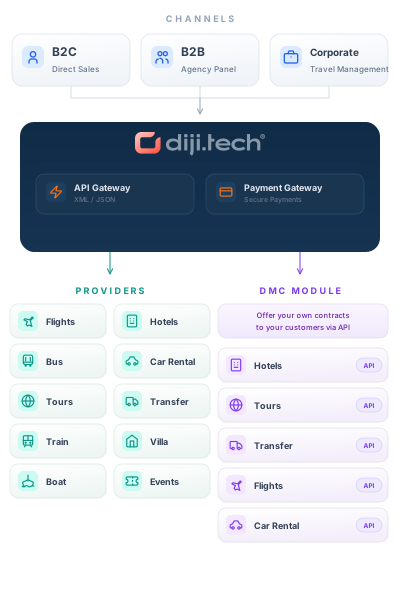
API Integrations
Integrate with leading service providers in the industry.






Why Us?
- Customers do not wait for all suppliers; streaming results lower abandonment.
- Commission is applied during search, so no price surprise at checkout.
- Commission is locked at prebooking; later rule edits do not move the total.
- When the quote expires the customer is warned and stale sales are blocked.
- Deactivating a supplier removes its products from the storefront instantly.
- Operators confirm a cancellation only after seeing the refund and the fee.
- Only the lead participant is mandatory, cutting form-filling effort.
- E-mail, phone, name and passport already collected are not asked twice.
- If the B2B service is down the home page loads and shelves stay hidden.
- Discovery shelves are cached for one hour per country and language.
- Panel reservation endpoints are staff-only, otherwise they return 403.
- The event vertical can be opened to staff first and tested live.
Your activity sales site: from search to session choice

Activity search
Region and district suggestions appear in groups as the destination is typed; the date range is picked on a two-month calendar, and guests are entered as adults, children and each child's age.

Listing, filters and sorting
The results header shows the number of activities found, the cheapest price and an editable search summary. The list narrows by category, time of day, audience, service and price, each option with its count, and sorts by price up or down or by name. Each card shows the category, place, duration, tags, the instalment option and the party's total price.

Activity page
Gallery, category, duration, number of options, refund status and service language at the top of the page; overview, meeting point, important information and dated cancellation terms on the same page.

Date and session choice
Date and session are chosen in the booking box; when the date changes, the price and the cancellation terms are fetched again for that day. The box shows the price per person, the party's total, the display currency and the currency the supplier charges in.
Activity sales on phones

On a phone the sales site opens in its own mobile view: the destination is searched in a full-screen list, guests are set in a bottom sheet, results are browsed by scrolling, filters and sorting open in bottom sheets, and the activity page holds the gallery and the option, service language, date and session choice.
- Full-screen destination search with region and district labels
- Filters and sorting in bottom sheets
- Option, service language, date and session on the activity page
Frequently Asked Questions
No. Diji Tech Event Ticket Software is a supplier-integrated sales module for event and experience tickets; inventory and allotment stay with the connected suppliers, and the panel has no venue, session or numbered-seat setup.
The module connects to the /activity/* endpoints of the Diji Tech B2B backend, which handle search, cart, booking, voucher and cancellation. The suppliers defined in the panel are DMC (Self Inventory) and Bedsonline.
Commission rules carry a name, a 0-999 priority, a percentage or fixed-amount mode, a validity range and a condition tree, and can be tested with a dry-run modal. Contact Diji Tech for pricing.
Checkout is a single-page flow and a BIN lookup on the first card digits lists installments. After booking the customer gets an HTML e-mail and an SMS, and the voucher downloads as PDF from the panel.
Staff cancel from the panel: refund amount, cancellation fee and validity appear as an offer first, and a confirmed cancellation posts instantly. The refund is processed manually on the B2B side.
Request a Demo
Request a free demo to explore our product and see how it can benefit your business.
Demo & Get Quote