
Hotel Booking and Inventory System for Agencies
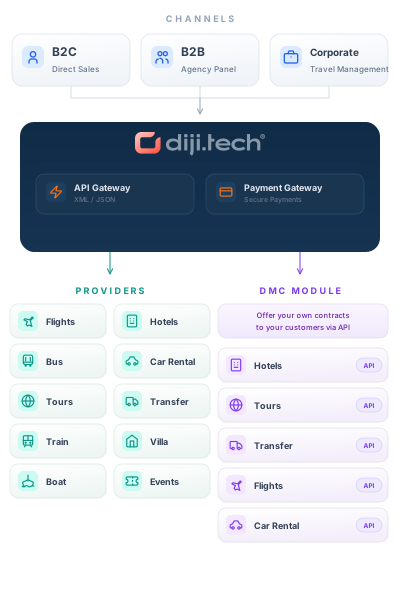
Merge third-party hotel inventory with your own contracted hotels in one search screen and sell to your sub-agency network at your own price.

Suppliers and Contracts in One View
Connected supplier hotels are priced in the same list as your own contracts.
Per-Agency Price and Balance
The raw supplier rate is stored; each agency sees the price after its own rules.
Allotment and Stop-Sale Control
Daily room counts, stop-sale and release periods on your own hotels.
Product Features
- Hotel search that queries every connected supplier at the same time
- Records of one hotel from different suppliers merged into one identity
- Content merge in which the lowest cost offer wins the sale side
- Shared board language with the RO, BB, HB, FB, AI and UAI code set
- Rooms, daily rates and allotment for your own contracted hotels
- Day level allotment calendar, stop-sale and release period
- Rate lines split by board, rate group and length of stay
- Pricing rules for extra bed, children, early check-in and late check-out
- On-request hotels handled by a confirmation link sent to the property
- Sales flow staged as prebooking, payment and confirmation
- Penalty quote, agency approval and refund steps on stay cancellation
- Stay voucher issued in your company name plus a booking timeline
- Hotel location search broken down by district and area
- Room type mapping across suppliers
- Facility amenities normalised into a shared vocabulary
- Hotel and room images consolidated in a single pool
API Integrations
Integrate with leading service providers in the industry.






Why Us?
- Sell supplier hotels and your own contracts in the same comparison.
- Sell with hotel name, image and address even on content-poor sources.
- Open your contracts to your dealer network without paying a middleman.
- Daily allotment and stop-sale stop overselling at the source.
- Days missing a rate or allotment are caught by report before they sell.
- If one supplier is silent the search keeps running on other sources.
- You decide which supplier source each sub-agency is allowed to see.
- Run several contracts with the same supplier as separate accounts.
- See the cancellation penalty before it is final and quote it exactly.
- Booking status refreshes by itself on suppliers that support it.
- Report sales by agency, sub-agency, supplier and date.
- Open balance until the stay date stays inside the credit limit.
- Asynchronous querying
- 7 billion+ queries per day capacity
- Easy and fast to use
- Unlimited GSA → Sub-Agent network capability
- Multi-language and multi-currency support
- Integrated Ticket Support system
- Announcement system
- RESTful API provisioning capability
Hotels in the agency panel: from search to room and cancellation terms

Search and result cards
Search by region, check-in and check-out dates, adults and children room by room (with each child's age) and guest nationality; the summary bar opens the search for editing in one click. Each card shows stars, district and distance to the centre, board, the cheapest room, the free-cancellation date when there is one, the total for the nights and guests, and the nightly average.

Map and sorting
"See on map" on a card opens the hotel on the map: the hotels found show as clusters and price pins, and the popup has the photo, stars, board and total price, with the filters beside the map. Results sort by the recommended order, price, guest score, stars or hotel name.

Table view and filters
Results show as cards, a list, a compact list or a table; the table puts hotel, cheapest room, cancellation and price on one row. The location filter lists districts and their areas with hotel counts; price range, stars, guest score, board, cancellation flexibility, facilities, themes, property type, distance to the centre and room size narrow the results further.

Picking options for a customer offer
"Create offer" turns on selection in the results: tick the hotels and, for each one, pick the room that goes into the offer from a list that shows its board and cancellation terms. The choices gather in the bar at the bottom.

Hotel page, rooms and cancellation terms
The hotel page opens in a new tab: address, dates and number of nights, the starting price and a path back to the results. Each room type gets one card with its board rows and prices; prices include all taxes. "Details" opens the cancellation policy: when the free period ends and the penalty after it.
How the system works
The main administrator, GSAs, and agencies work in the same system, each with their own account. Prices build along this chain: every level adds its own rule.
Who does what
Main administrator
Opens agencies and sets the Standard or GSA type, DMC access, balance, and enabled modules and menus. A new agency starts passive and is activated when ready.
GSA
Opens its own sub-agencies, manages their balances, and writes pricing rules for them.
Agency
Works under the main administrator or a GSA. Signs in to the panel with its own users, searches, sells, and adds its own pricing rule. With DMC access, it also manages its own inventory. Rules and amounts of the levels above stay hidden from it.
Finance and tracking
Balance, account activity, invoices, and reports in the same panel.
Balance
The main administrator and GSAs assign balances to agencies; if the wallet screen is on, an agency can also top up from its own screen.
Account activity
Agencies follow their account activity from the panel; the account statement opens if the accounting system supports it.
Invoices
Sales invoices and commission invoices can be viewed from the panel.
Reports
Sales, profitability, and commission reports in the panel.
Frequently Asked Questions
Yes. You define the hotel profile, rooms, daily rates and allotment in the panel; once active it is listed alongside supplier hotels.
No. Supplier hotel codes are linked to a shared identity, so the cheaper offer wins and missing content is filled from the other source.
Yes. Results are cached at the raw supplier rate, then markup rules apply per reading agency. Rules can be scoped by supplier or country.
Each room keeps a day by day line with room count, minimum stay and release period. A day closed with stop-sale never reaches the search.
Paximum, Hotelbeds, Travelrobot, RateHawk, DOTW (WebBeds), GoGlobal and Juniper are registered. Your contracted inventory is a separate source.
Cost follows the number of suppliers, the volume of contracted hotels and the depth of your network. There is no fixed list price.
Request a Demo
Request a free demo to explore our product and see how it can benefit your business.
Demo & Get Quote