
Boat and Yacht Rental Software
Your own fleet and connected supplier yachts in one search: a yacht charter site under your brand, with a site editor and a site panel.

Your Fleet and Supplier Yachts in One List
Guests search by marina, region or country, dates and number of guests, and see prices for the chosen dates.
A Full Page for Every Yacht
Gallery, specifications, extras, season prices, availability and cancellation tiers on one page.
Edit the Site Yourself
Text, sections, theme and languages change in the site editor and stay in a draft until you publish.
Browse the demo site yourself
Search, yacht pages and prices work on the Demo Yacht sample site. We can build a similar site with a design tailored to your brand.
Product Features
- A yacht charter site on your own domain, under your brand
- Search form with marina, region and country suggestions
- Check-in and check-out calendar with a Saturday-to-Saturday hint
- Bareboat and crewed charter type choice
- Your own fleet and connected supplier yachts in the same list
- Filters for price for the dates, yacht type, cabins, berths, length, year built and equipment
- Sorting by price, length, newest and number of cabins
- Total for the dates and price per night, mandatory fees included
- Yacht page with gallery, specifications, accommodation and equipment
- Extras that are included, optional or paid at the base
- Season prices, availability calendar and cancellation tiers
- Announcement bar with a campaign code, blog, FAQ and newsletter sign-up
- Bottom tab bar and fixed price bar on phones
- Site editor and site panel
API Integrations
Integrate with leading service providers in the industry.







Why Us?
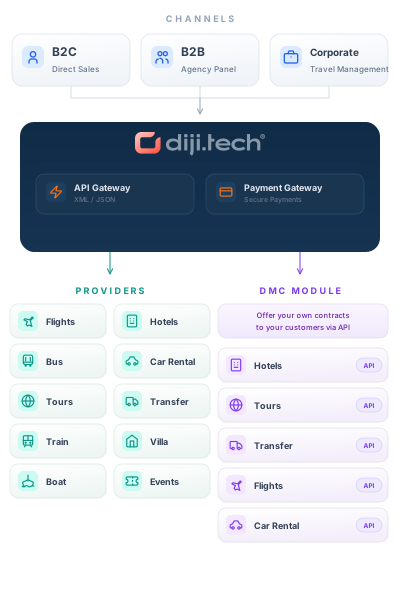
- Your own boats and supplier yachts reach guests in one list.
- The card shows the total for the chosen dates, mandatory fees included.
- The free-cancellation window is shown on the card and the yacht page.
- Guests review a yacht together with its season prices and availability.
- Content, theme and languages change without waiting for a developer.
- Changes stay off the live site until you publish.
- Forms, members and bookings from the site come together in the panel.
- The site is designed to be used with one hand on a phone.
Your yacht charter site: from search to the yacht page

Search and the yacht list
Guests search by marina, region or country, dates and number of guests. Your own fleet and connected supplier yachts appear in one list, filtered by price for the dates, charter type, cabins and equipment, and sorted by price, length or year built.

A full page for every yacht
Photo gallery, key facts and technical specifications on one page. The price box shows the total for the chosen dates, the price per night, mandatory fees and the free-cancellation date.

Extras, seasons and availability
Extras that are included, optional or paid at the base are listed separately. Season prices, the availability calendar and cancellation tiers are on the same page.

Edit right on the page
Double-click a heading and type in place, or switch a section's layout in one click. Changes stay in a draft until you publish.

Colours and fonts
Pick your brand colour and the editor checks that the text stays readable. Heading and body fonts change in the same panel.

Site panel
Site health and a sales summary, contact and newsletter forms, registered customers and the yacht bookings from the site, in one panel.
Run the site yourself
Edit the sales site’s content and settings from the panel and the visual editor.

Site editor
Add sections from the catalogue, reorder or hide them, and edit the page in each language with desktop, tablet and phone previews.
- Edit headings in place on the page
- Add new sections from the catalogue
- Phone and tablet preview
- A draft with undo and redo until you publish
Customize the design to fit your brand

Change colors, fonts, corners, header and footer layouts, and section views in the site editor.
- Color, font, font size, corner, spacing, and shadow settings
- Ready-made header and footer layouts
- Add, move, and hide sections
- Desktop, tablet, and mobile preview
- The live site stays the same until you publish
Your yacht charter site on phones

On a phone the bottom tab bar stays on every page, and search, filters and results work with one hand. On the yacht page the price bar stays fixed at the bottom of the screen.
- Bottom tab bar on every page
- Search, filters and results on a phone
- Fixed price bar on the yacht page
AI agent: Diji does the work in the panel for you

Write your request in plain language. Diji finds the data, does the math, and puts the result in front of you. It knows about 2,000 panel operations and uses only those within your access.
- Prepares sales reports: summary figures, a chart, and agency rankings, with CSV and Excel export
- Finds and summarizes reservations; checks options and the refund queue
- Drafts pricing rules and shows their effect with a sample price
- Searches flights, shows results as cards, and gives the reason for its recommendation
- Drafts roles; prepares blog posts, SEO text, and destination content
- Changes come as an approval card and do not apply without your approval
Frequently Asked Questions
Yes. Your own fleet is managed in the platform's yacht module with its yachts, prices, extras and closed periods, and it is listed in the same search on the site together with the yachts of connected charter suppliers.
Yes. In the site editor you edit headings right on the page, add sections or switch their layout, and choose colours and fonts. You edit each language separately and preview the phone and tablet views; changes stay in a draft until you publish.
Yes. Search, yacht pages and prices work on the Demo Yacht sample site at demoyacht.diji.app. We can build a similar site with a design tailored to your brand.
Standard setup is delivered in 1 week. Pricing depends on the scope, the inventory suppliers and the customisation you need, so contact Diji Tech.
Request a Demo
Request a free demo to explore our product and see how it can benefit your business.
Demo & Get Quote